You published two articles on similar topics. You thought more content meant more chances to rank. But instead of climbing, both pages are stuck. They get impressions but no real clicks. Your rankings keep fluctuating for no clear reason.
The problem might not be your writing. It might be keyword cannibalization.
This is one of the most overlooked SEO mistakes, and it quietly affects thousands of blogs and business websites that publish regularly without a clear content plan.
Here is what keyword cannibalization is, how to spot it on your own site, and exactly how to fix it.
What Is Keyword Cannibalization?
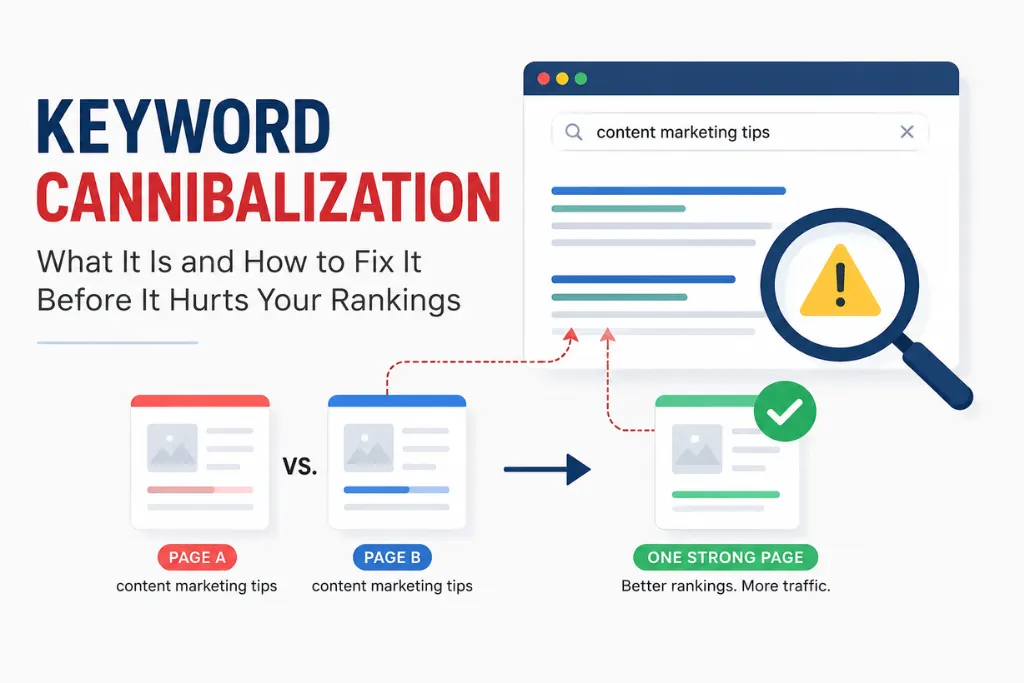
Keyword cannibalization happens when two or more pages on your website target the same keyword or a very similar search query. Instead of one strong page ranking, Google is forced to choose between multiple pages, and it often picks the wrong one, or keeps switching between them.
Think of it this way. If you have two articles both trying to rank for “content marketing tips,” Google does not know which one to prioritize. So it may show the older, weaker article instead of your better, updated one. Or it may dilute authority between both and rank neither of them well.
According to Moz, when multiple pages compete for the same query, search engines split the link equity and relevance signals between them, which weakens the overall ranking potential of both pages.
The result is lower rankings, inconsistent traffic, and wasted content effort.
Why Keyword Cannibalization Happens
Most websites do not set out to cannibalize their own content. It happens gradually, usually because of one of these reasons:
Publishing without a content plan. When you write articles based on ideas rather than a mapped keyword strategy, it is easy to accidentally cover the same topic twice from slightly different angles.
Similar topics written at different times. A post written six months ago and a new one written today might target overlapping keywords without you realising it.
Blog posts vs landing pages competing. A service page targeting “SEO for small businesses” and a blog post on the same topic will compete against each other even though they serve different purposes.
Poor internal linking. Without a clear internal linking structure, Google cannot identify which page you consider the primary one for a given topic.
If you are publishing content regularly without a keyword map, cannibalization is almost inevitable over time.
How to Tell If You Have Keyword Cannibalization
You do not need expensive tools to check for cannibalization. Here are the most reliable methods.
Google Search Console Method
Go to Google Search Console and open the Performance report. Search for a keyword you are targeting. If you see two different URLs appearing in the Pages tab for the same query, those pages are cannibalising each other.
Also look for queries with high impressions but unusually low click-through rates. This can be a sign that Google is confused about which page to show.
Site Search in Google
Type the following into Google:
site:yourwebsite.com “your target keyword”
If two or more pages appear in the results targeting the same term, you have a cannibalization issue.
Signs to Watch For
- Rankings for a keyword keep fluctuating week to week
- Two of your URLs appear for the same search query in Search Console
- A page that used to rank well dropped after you published a similar article
- High impressions but low clicks on multiple similar pages
Tools like Ahrefs and Semrush also have dedicated cannibalization reports if you want a faster, site-wide audit.
How to Fix Keyword Cannibalization (5 Methods)
Once you have identified cannibalizing pages, here is how to fix them. The right method depends on how similar the pages are and how much traffic each one gets.
1. Merge the Two Pages Into One
If both articles cover the same topic and neither is performing well individually, the best fix is to combine them into a single, comprehensive piece.
Take the best sections from each article, merge them into one stronger page, and redirect the URL you are removing to the one you are keeping. This consolidates your link equity and gives Google a clear, authoritative page to rank.
This works especially well when both pages are thin on their own but would be strong together.
2. Use a 301 Redirect
If one page is clearly stronger, better written with more backlinks and more traffic, redirect the weaker page to the stronger one using a 301 redirect.
This tells Google permanently that the weaker URL no longer exists and passes its authority to the surviving page. Over time, the remaining page should see a ranking improvement.
3. Use a Canonical Tag
If you need to keep both pages live for business or structural reasons, use a canonical tag on the weaker page pointing to the stronger one.
This tells Google which page you consider the primary version without deleting the other. It is a softer solution and works well when both pages serve different audiences but overlap on keywords.
As Google’s Search Central documentation explains, canonical tags help consolidate ranking signals when duplicate or near-duplicate content must coexist.
4. Reoptimise One Page for a Different Keyword
Sometimes both pages are valuable and serve different purposes. In this case, shift the focus of the weaker page to a different but related keyword.
For example, if two articles are both targeting “content marketing strategy,” you could reoptimise one to focus specifically on “content marketing strategy for startups” or “B2B content marketing strategy.” Now they serve different search intents and stop competing.
This approach also helps you understand search intent more clearly, because you are forced to define what each page is really trying to answer.
5. Delete the Weaker Page
If a page is thin, outdated, gets no traffic, and adds nothing unique, deleting it is sometimes the cleanest solution. Redirect it to the strongest relevant page on your site before removing it.
This is part of a broader SEO content audit process where you regularly clean up pages that are hurting more than helping.
How to Prevent Keyword Cannibalization Going Forward
Fixing existing cannibalization is important, but preventing it in the future saves you far more time.
Maintain a keyword map. Keep a simple spreadsheet that maps each target keyword to one URL on your site. Before writing any new article, check this map to make sure no existing page already covers that term.
Plan your content clusters before writing. When you build a proper content cluster structure, each supporting article targets a specific sub-topic under the pillar. This makes cannibalization far less likely because each piece has a clearly defined role.
Check existing content before creating new articles. Before you write on any topic, search your own site for related articles. If something similar already exists, update it rather than creating a new competing page.
Use internal linking as a priority signal. When you link to a page from multiple other articles using consistent anchor text, you signal to Google which page is the primary one for that topic. A strong internal linking strategy is one of the most effective ways to guide Google toward the right page.
Keyword Cannibalization vs Duplicate Content: What Is the Difference?
These two issues are related but not the same.
Duplicate content means two pages have identical or near-identical text. Google filters one out of the results entirely.
Keyword cannibalization means two pages target the same keyword but may have completely different content. The pages are unique, but they are competing for the same search query.
Both can hurt your rankings, but they require different fixes. Cannibalization is often subtler and harder to spot, which is why it goes unnoticed on so many sites.
If you are also dealing with orphan pages, pages with no internal links pointing to them, these are often connected to cannibalization issues, since orphan pages tend to exist outside any planned content structure.
Frequently Asked Questions
Does keyword cannibalization always hurt rankings? Not always immediately, but over time it weakens both pages. Google may rank one, then switch to the other, causing ranking volatility. The longer it is left unfixed, the more it damages your overall authority for that topic.
Can internal linking fix cannibalization? Internal linking helps Google understand which page is your preferred one for a given topic, but it is not a complete fix on its own. It works best alongside one of the five methods above.
Should I always delete the weaker page? No. Deletion is only the right move when a page has no traffic, no backlinks, and adds nothing unique. In most cases, merging or reoptimising is a better approach because it preserves whatever value the page has built up.
How often should I check for cannibalization? A good practice is to run a cannibalization check every time you do a content audit, ideally every three to six months if you publish regularly.
Final Thoughts
Keyword cannibalization is not a rare or advanced SEO problem. It affects almost every site that publishes regularly without a mapped content strategy.
The fix is not complicated. Identify the competing pages, choose the right method: merge, redirect, canonicalise, reoptimise, or delete and then build habits that prevent it from happening again.
Start with a content map. Plan your pillar pages and supporting articles before you write. And check your existing content before creating anything new.
A little structure now saves a lot of cleanup later.